
Want to publish an asset to the ABBYY Marketplace?
Fill out this form and we will work with you to get it online.
These Contribution Guidelines apply to all contributors who want to publish cognitive skills or other assets to the ABBYY Marketplace. ABBYY may at any time and at its sole discretion modify these guidelines, with or without prior notice. Any such modification will be effective immediately upon posting of modified guidelines by ABBYY.
The ABBYY Marketplace provides an extensive online library of reusable intelligent automation assets, including AI models (delivered as cognitive skills), connectors, and custom activities. The Marketplace includes assets by ABBYY as well as assets developed by our broad network of certified partners.
The ABBYY Marketplace provides an extensive online library of reusable intelligent automation assets, including AI models (delivered as cognitive skills), connectors, and custom activities. The Marketplace includes assets by ABBYY as well as assets developed by our broad network of certified partners.
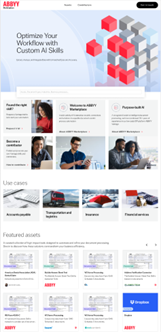
On the ABBYY Marketplace home page, available under www.abbyy.com/marketplace, you can see various highlighted topics and use cases as well as featured assets, curated by the Marketplace administrators. As we onboard new partners and publish new assets we are going to refresh these areas and provide Marketplace visitors with information and ideas on how they can kick-start and expand their automation initiatives with pre-built assets.
Under “Assets” on the top menu you can navigate to the Asset Catalog listing all assets available on the ABBYY Marketplace. Using the filter options on the left you can browse through assets filtered by specific criteria such as industry, business process, supported languages and more.
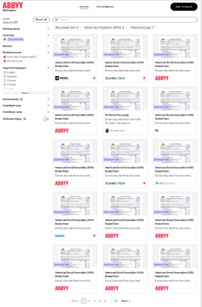
Asset cards give a quick overview of a particular skill or asset, including the name, a short description, and the contributor who published this asset to the ABBYY Marketplace.
An asset may have a “Verified by ABBYY” badge, which means that it has undergone rigorous testing and ABBYY has verified that it meets a high standard and quality. This label is granted by Marketplace administrators. All ABBYY-developed Production Skills and Connectors meet this “Verified by ABBYY” level.
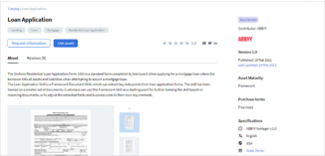
By clicking on an asset card, you will come to the asset page. Here you can find detailed information about the asset you have selected, including technical specifications and documentation. From the asset page, you can start a trial of the asset (if it is paid), download it directly (if it is free), or request further information from its developer.
On the asset page you can also find other related assets such as process skills, document skills and connectors.
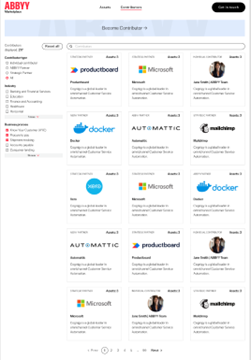
All contributors that have published at least one asset are displayed under the Contributors tab.
Contributors can be filtered by their type, by the industry and business process for which they have published assets and searched by the name.
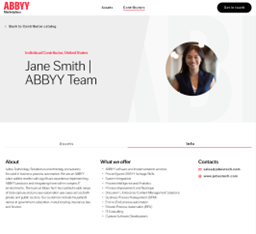
When you decide to publish your first asset to the ABBYY Marketplace, you will need to create your contributor page. This should include information about the company in whose name you are publishing these assets to the ABBYY Marketplace as well as public contact and support information for users.
This page will be the place where ABBYY Marketplace visitors go to learn more about the developer of an asset.
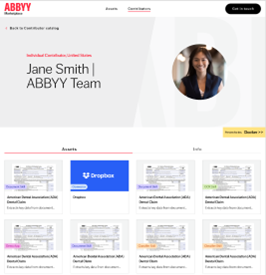
Here Marketplace visitors can also see all assets published by the contributor.
ABBYY partners, customers, and individual contributors can join the marketplace and become a contributor of free or commercial assets and help members of the community accelerate their own projects.
Any organization or individual is eligible to publish skills and assets. All contributors will be categorized by the Marketplace Administrators as one of the following types:
Initially you submit your assets via this form.
As soon as you submit the form an email will be triggered with a personalized upload link where you can upload files required for publishing your assets - logo, asset file etc.
ABBYY Marketplace administrators will create your contributor page and asset pages and share with you for review prior to publishing.
New contributors: If you are publishing an asset to the ABBYY Marketplace for the first time we ask you to provide information about your company, the services you provide and how visitors can get in touch with you.
This information will appear on your contributor page, which will provide ABBYY Marketplace visitors with information about your services and the assets you have published. This step is only required the first time you publish an asset.
Please fill out all required fields with your company’s information as described in the form. The ABBYY Marketplace is currently available only in English, so please provide all information in English only.
Existing contributors: If you already have published assets to the ABBYY Marketplace that means you already have a contributor page. In that case the form will lead you directly to the fields required for publishing an asset and skip all company-related fields.
The ABBYY Marketplace offers a variety of different assets to support citizen developers on their digital transformation journey.
Once your skill is ready to go, export it from Vantage to provide it for download in the ABBYY Marketplace.
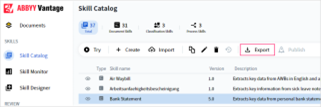
In the Skill Catalog, select the skill(s) you would like to export and click the Export button. The skills will be exported as .zip files, which you can upload to the ABBYY Marketplace when publishing a skill.
The most recently published version of a skill is exported by default. You may also export any previous version of a skill. To do so, you should copy the desired version and then export it.
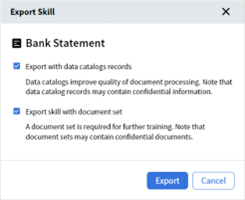
When you export a Skill, Vantage will prompt you to select whether you want to include the document set used to train this skill or the skills it’s referring to.
Skills published to the Marketplace are restricted by a trial or production license volume a customer has purchased. In the future, ABBYY plans to introduce the ability to license and restrict partner developed skills in the customer environment. Currently all partner developed skills require a Vantage Core Cognitive Skills license volume in the customer environment. We encourage partners to start by publishing production or preview skills, connectors, and other assets that a Vantage user can download and use based on their trial or production licenses.
Later, ABBYY plans to introduce the ability to protect skills with a license in order to be able to offer these as a yearly subscription based on ABBYY Vantage.
To publish an asset to the ABBYY Marketplace, you need a set of required documentation and accompanying materials:
See further details on required documentation under section 4.2, Creating an asset page.
Initially you can submit your assets via this form.
If you already have published assets to the ABBYY Marketplace the form will direct you to the fields required for the creation of an asset page where you can complete the information about the asset.
Note: in order to ensure better usability and overview to the visitors of the ABBYY Marketplace the Administrators will enforce the requirements listed below by rejecting assets that fail to comply.
| Asset description | Asset name* | This name will be displayed in the Marketplace catalog and on the asset page. The version number of your asset will be added by the Administrators upon approval. See also section 4.2.1., Asset naming convention. |
| Asset type* | Here you can select the type of your asset: • Document skill • Connector • Classification skill • Process skill • Solution • Document splitter skill • Custom activity (coming soon). |
|
| Asset version* | Here you can fill in the number of your asset’s version. | |
| Full description* (Maximum length is 1500 characters) |
This description will appear on the asset page. Describe what problems your asset solves and what exactly it offers. | |
| Asset benefits* | Describe the benefits users will achieve by implementing your skill or other asset into their automation and digital transformation workflows. You can add a new benefit as a bullet point by clicking Add a benefit point. | |
| Use case | Industry* | Select one or more verticals in which your asset is commonly used. If your asset can be used in any industry, select Horizontal. Note: if your asset is relevant for all industries please do not select all available industries in the list – this makes the filtering option redundant. Select only “Horizontal”. |
| Business process* | Select one or more business processes in which your asset would typically be used. Note: if your asset is relevant for all business processes please do not select all available processes in the list – this makes the filtering option redundant. Select only “All”. |
|
| Technical details | Vantage versions compatibility* | Which Vantage release version was this asset tested with. |
| Supported countries | Select the countries for which your skill supports regional settings, such as tax rules. | |
| Supported languages | Select the document languages that your skill can process. | |
| Asset maturity* | Available options are Production and Preview. See section 3.1, Asset types, for more information. | |
| Asset cost* | Paid – Select this option when your asset is fully trained, production ready and you would like to charge for it. Free – This option can be used when you would like to provide your asset to ABBYY Marketplace users free of charge, for example a preview skill or a Connector. See section 4.4, Free vs. paid assets. |
|
| Support Information* | By developer | This option is required for all Production skills and other assets that are provided at cost. This means that you, as the developer of this asset, are responsible for providing customer support to the users of this asset. |
| By community | This option is available for all Preview and Demo Skills or other assets. By selecting this option, you inform customers that they can ask the ABBYY community for help. If you prefer to provide customer support for a Preview and Demo/free asset published by you, you can select the By developer option. | |
| Support terms | Here you can provide a link to specific support terms for your asset (optional). | |
| Privacy policy | Here you can provide a link to detailed information about your organization’s privacy policy if necessary (optional). | |
| Asset terms* | Open source | You can select an open source license for your asset. Please note that these licenses are very permissive for users and basically do not contain any restrictions as long as users comply with the terms of the license (e.g. these licenses allow users to modify an asset, make derivative works based on an asset, distribute an asset on any other website). |
| Commercial | If you wish to impose stricter typo on the use of your assets here you can provide your unique license text. | |
| Attachments to publish | Company logo | PNG, 504*504 px, transparent background Note: this is required only the first time you submit an asset for publishing. |
| Asset file | Upload the asset file or the .zip file of the skill as it was exported from ABBYY Vantage. In some cases, it is possible to create an asset page on the ABBYY Marketplace without uploading an asset file and instead refer customers to your own website for download. | |
| Target URL | If no asset file will be provided for download please provide an URL where the asset is hosted by you or where the visitor can learn more about your asset. | |
| Documentation* | Upload PDF files of the technical documentation of your skill or other asset. | |
| Demo set | Upload examples of documents that can be processed by your asset or other screenshots that demonstrate the use of your asset. Note: Demo documents should not contain any confidential or personal information, as these documents will be publicly accessible. |
|
| Link to demo video | A YouTube link to a short demo of the asset you are publishing. |
As soon as you submit the form an email will be triggered with a personalized upload link where you can upload files required for publishing your assets - logo, asset file etc.
ABBYY Marketplace administrators will create your contributor page and asset pages and share with you for review prior to publishing.
In order to ensure unified structure and a clear overview for visitors, we ask all contributors to follow some simple naming rules for their assets:
For example: Bill of Lading; Purchase Order; Invoice JP; IRS Tax Form 1040, U.S. Individual Income Tax Return. Please review the existing assets in the marketplace for examples of how to best name your assets for submission.
If you need to edit or update an asset that has already been published please contact the ABBYY Marketplace administrators un
It is up to your discretion whether you want to provide your assets in the ABBYY Marketplace free of charge or as paid assets with a possibility for users to test functionality.
Generally, free assets can be preview skills, connectors, or other future assets, which require further training on the user side in order to be used in production environment. Preview skills can simply offer a starting point or a demonstration of a concept, but still require a valid Vantage trial or production license to use. When a preview skill is used in production, the usage will consume the Vantage core page subscription volume license. Connectors between ABBYY Vantage and other automation platforms also are generally offered free of charge.
Production Skills typically provide a quick path to production, having been trained on a large document set with the option to be further trained on the customer’s documents. Production Skills are typically offered on a yearly subscription basis. These can be Document Skills or Process Skills, which offer an end-to-end solution to a business process by combining multiple Document Skills with classification and business rules. A Production Skill will often require an additional page volume subscription license in order to use.
Generally, contributors are required to provide technical support for paid assets. See further details in section 6, Support and maintenance, as well as in the Additional Terms of Services for Contributors.
Using marketplace Vantage Skills requires a customer to have either an active Vantage Trial or a Production License. All skills that have Asset Maturity as “Production” require a Vantage Production Skill License.
Assets submitted to the ABBYY Marketplace are subject to quality assurance and approval from the ABBYY Marketplace administrators. Assets submitted to the ABBYY Marketplace must fulfill the following requirements:
ABBYY may reject the asset you have submitted if it does not fulfill one or more of the above requirements or if it shows other unexpected issues. Upon rejection, the ABBYY Marketplace administrators will provide additional information.
The assets you publish to the ABBYY Marketplace should always be compatible with at least one of the currently supported versions of the ABBYY product they interact with or are intended for.
If the asset you have published is paid, you are required to provide customer support to its users.
If the asset you have published is free, you can select the Community support option, which means the user will be able to pose any questions to the ABBYY Community to seek help.
You should respond to customer support requests regarding assets you have published to the ABBYY Marketplace within a reasonable time, i.e. within 2 business days.
If you decide to discontinue an asset you have published to the ABBYY Marketplace, provide ABBYY and all users of this asset with a 30-day notice.
Depending on your Contributor type, ABBYY may provide you with information regarding users who have demonstrated interest in the assets you have published to the ABBYY Marketplace. This may include information about who downloaded your assets, who is currently using your assets as a trial version or as a paid subscription, etc.
Inquiries (requests for information) regarding skills and assets published by you will be sent directly to the public e-mail address you provided on your Contributor webpage.
You should respond to customer inquiries regarding assets you have published to the ABBYY Marketplace within a reasonable time – i.e. within 2 business days.
Initially, such information may be provided manually in the form of monthly reports.
Later, ABBYY plans to provide such information automatically within the Contributor account.
By publishing assets on the ABBYY Marketplace, you get a unique opportunity to present your solutions and services to the broad community of ABBYY customers and partners.
Providing Preview Skills to ABBYY Marketplace visitors means not only serving the community, but also connecting with users who may be interested in your solution, providing you with the opportunity to deliver additional services or other solutions.
Preview skills (free) that have matured over time can be converted into production skills (paid) with a future update. In the event that a preview skill is converted to a production skill, users interested in receiving the latest update to that production skill will be required to convert to a yearly subscription. Users who prefer to use the free version of the skill can continue using the last free version of the preview skill for as long as this is technically possible.
As a partner, you have the opportunity to start off with offering preview skills and later transition them to production skills.
Providing a Connector to your automation platform enables your users to easily connect and integrate cognitive skills from ABBYY Vantage into their automation workflows, which increases business value and ROI.
Publish ready-to-go assets to the ABBYY Marketplace, where users can easily find them, try them out, and contact you when they are ready to purchase.
If you have questions, require support, or have feedback about the ABBYY Marketplace, please contact us at marketplace-support@abbyy.com.